MultiPortal Community Return to multiportal.io
Skip to content
  • Categories
  • Recent
  • Tags
  • Popular
  • Support Portal
Collapse
woodyW

woody

@woody
Staff
About
Posts
6
Topics
0
Shares
0
Groups
2
Followers
0
Following
0

Posts

Recent Best Controversial

  • Console not working
    woodyW woody

    Hey @southwalesowl,

    Adding the 127.0.0.1 multiportal.calligo.cloud hosts entry just allows MultiPortal and the console server to talk to each other locally, however, the error you now have ECONNREFUSED 127.0.0.1:443 means the console server cannot reach MultiPortal locally on port 443. That loopback shortcut only works when MultiPortal is handling its own traffic directly on the server.

    Can you please confirm:

    • MultiPortal was installed using the automated script?
    • Is an SSL configured on the box, or are you using a Load Balancer for MultiPortal?
    • Confirm the system is reporting on port 443 sudo ss -ltnp | grep ':443' You should see something like
      ⎿ LISTEN 0 4096 *:443 *:* users:(("caddy",pid=4140634,fd=7))

    Can you also comment out that hosts entry you added to your MultiPortal server, restart the console server, and try connecting again? Let me know if the old error comes back after you regenerated the new API key.

    Matt

    Compute & VMs

  • Console not working
    woodyW woody

    Hi @southwalesowl

    Have you been able to connect to the console using the Service Provider account?

    If not, can you please run through the steps outline on this page, particularly the one around the API key: https://docs.multiportal.io/troubleshooting/console-server/

    Matt

    Compute & VMs

  • MultiPortal v1.1.3 – Several Issues Encountered with Proxmox VE 9.2.3
    woodyW woody

    Hey @guillaume

    Thanks for the report:

    #1 (clone “Source VM data not found”): Yes, that error message is a bit misleading. From what you’re describing, the Proxmox-side clone has actually completed fine, and what’s failing is MultiPortal’s post-clone bookkeeping, where it tries to copy the template’s row into the local proxmox_vm_stats table to seed the new VM’s row. It looks like that lookup isn’t finding template vmid 110. To dig in a bit further, could you share:

    • runtime/logs/vm-clone.log and runtime/logs/VirtualMachine.log around the failure time
    • Was template 110 created in MultiPortal, or imported/converted directly in Proxmox? Was it ever migrated between nodes?

    The easiest way to get these logs to me is to export them from MultiPortal. The process is documented here: https://docs.multiportal.io/reference/log-files/#multiportal-application-error-logs. That produces a zip; email it to support@multiportal.io and it’ll open a ticket, and I’ll review the logs from there.

    #2 (Cloud-Init on self-created templates): Correct, at the moment MultiPortal doesn’t have a UI to attach a cloud-init disk to a VM before converting it to a template. Workaround for now is to add the cloud-init drive in Proxmox directly. I’ve raised this internally to discuss adding that functionality within MultiPortal.

    #3 (network not added / post-clone task never completes): The network attach is done asynchronously by a queue processor (vm-post-task/process) that runs from MultiPortal’s cron dispatcher. If the host-level cron isn’t invoking php yii cron/index, the queue will never drain and the task stays “active”, which matches what you’re seeing. Could you check:

    • Your host crontab has an entry like * * * * * cd /path/to/multiportal && php yii cron/index >/dev/null 2>&1
    • In Cron Task Management (MultiPortal admin UI), vm-post-task/process is listed, enabled, and Last Run is updating
    • Please run php yii migrate --interactive=0 so it applies any pending migrations without prompting. If anything errors out, send the output through to support@multiportal.io and I’ll take a look.
    • As a quick test, run php yii vm-post-task/process manually. If the network gets attached and the lingering task closes, scheduling is the only thing missing.
    • It’s also worth running ./yii cron/index manually once everything else is in place, just to confirm the dispatcher itself runs cleanly and to surface any errors that might be stopping it from progressing under cron.
    Compute & VMs

  • Adding datastores to storage policy does not work properly
    woodyW woody

    Hey @csmo

    I’ve just sent you a message asking for your logs, there is some information that I need to check.

    The most common issue that comes up, specifically with local-lvm, is if you’re running more than one Proxmox node. Are you able to confirm if you have more than one node, that shares the same name?

    Matt

    Storage

  • Decrypt credentials failure on VM create
    woodyW woody

    @heky said:

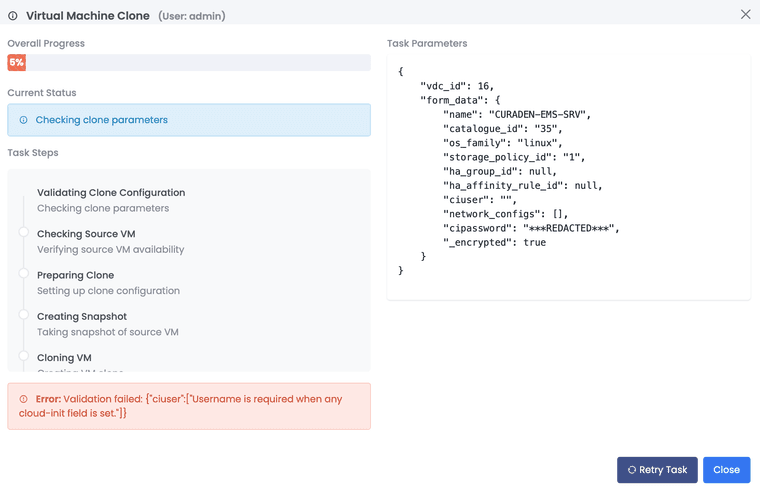
    But now in 1.1.3 there is another error Error: Validation failed: {“ciuser”:[“Username is required when any cloud-init field is set.”]} So probably you need to address this. Creation VM from template is not possible.Screenshot 2026-05-28 at 07.00.08.png

    @heky Can you please see my message I incorrectly directed to Twallace-armor.

    Compute & VMs

  • Decrypt credentials failure on VM create
    woodyW woody

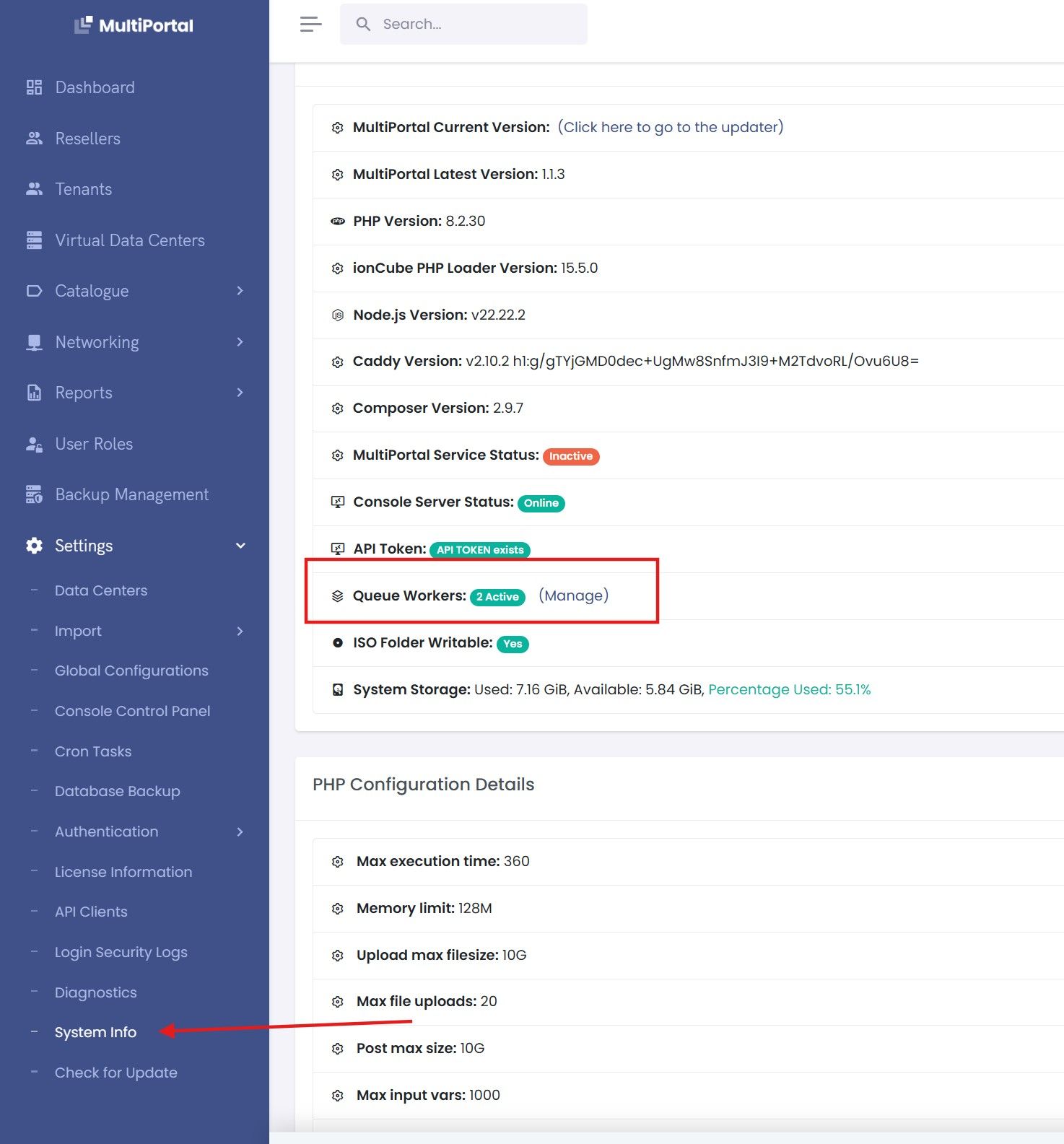
    Hi @twallace-armor, this may be caused by the MultiPortal queue workers needing a restart.

    Could you please navigate to Settings → System Info → Manage:

    67e879da-e23f-4a4a-a35b-b56446cd550c-image.jpeg

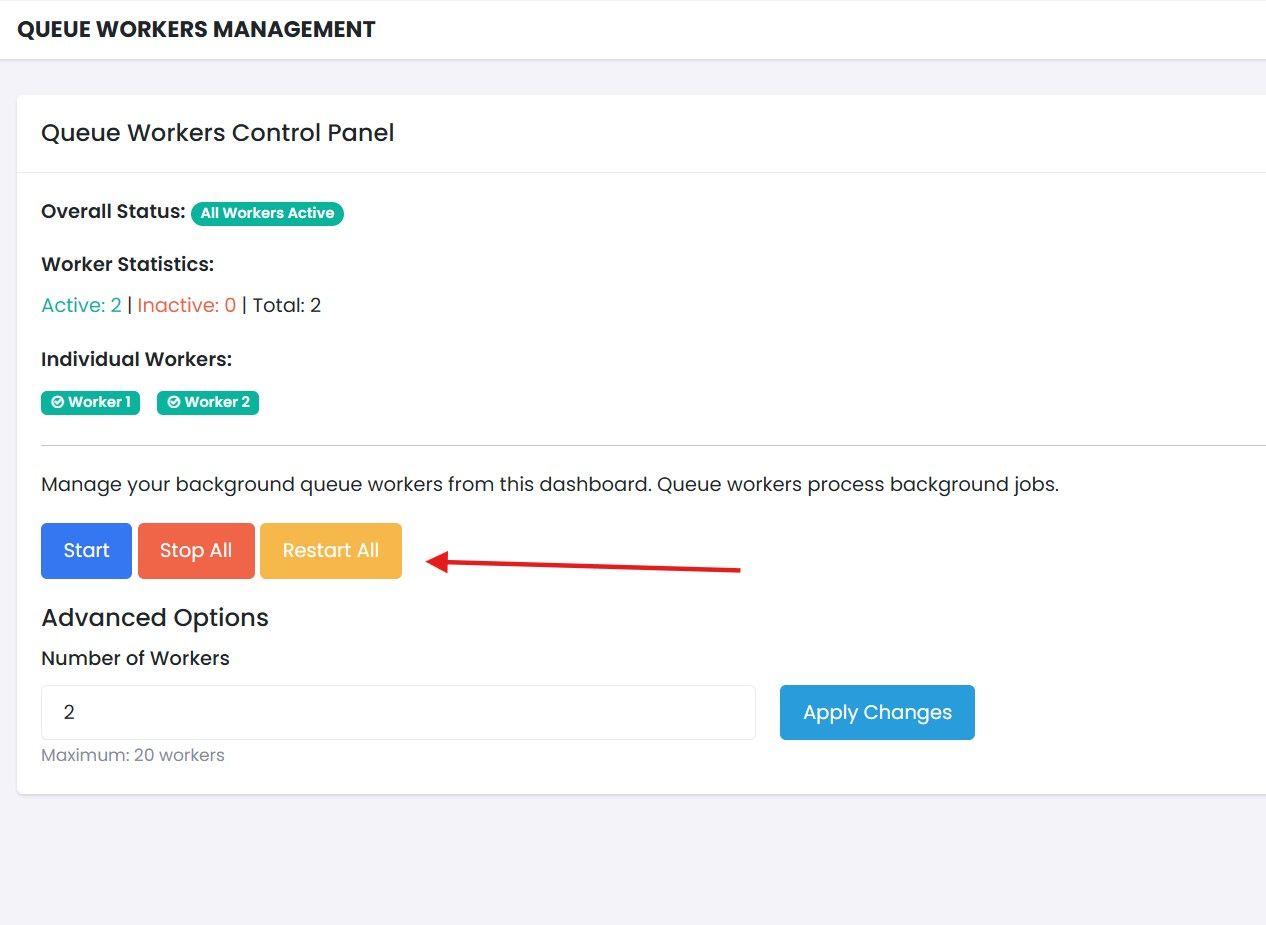
    Then click Restart All:

    7f67d6a8-7a47-442a-aeee-fa01c8d06d04-image.jpeg

    Once the services have restarted, please retry the task. If it still fails, could you try creating a new Virtual Machine.

    Compute & VMs
  • Login

  • Don't have an account? Register

  • Login or register to search.
Powered by NodeBB Contributors
  • First post
    Last post
0
  • Categories
  • Recent
  • Tags
  • Popular
  • Support Portal