Community Return to multiportal.io
Skip to content
  • Official Documentation: Reseller and Tenant Admin

    Product Feedback
    5
    1 Votes
    5 Posts
    275 Views
    StellS
    @AlessandroRamon Love the idea for an Italian translation! I’ll add it to the backlog. Here’s a tiny spoiler: tier-specific documentation (Provider, Reseller, Tenant).
  • 0 Votes
    3 Posts
    170 Views
    N
    Perfect, ideally as a provider having the ability to create a new tenant/reseller/VDC and specify the backing resource pool in PVE would work great as we have existing vms and permissions attached to those pools. We have some use cases where sub pools have unique permissions for a subset of the users which provides some helpful options to for organizing vms similar to how virtualcenter uses vm folders for organization.
  • Adding datastores to storage policy does not work properly

    Storage
    2
    3
    0 Votes
    2 Posts
    150 Views
    woodyW
    Hey @csmo I’ve just sent you a message asking for your logs, there is some information that I need to check. The most common issue that comes up, specifically with local-lvm, is if you’re running more than one Proxmox node. Are you able to confirm if you have more than one node, that shares the same name? Matt
  • [RELEASE] MultiPortal 1.1.3 is now available

    Product Updates
    3
    1 Votes
    3 Posts
    426 Views
    StellS
    You’re not going crazy, we haven’t announced PVE 9.2 support yet. We’re working on it I swear!
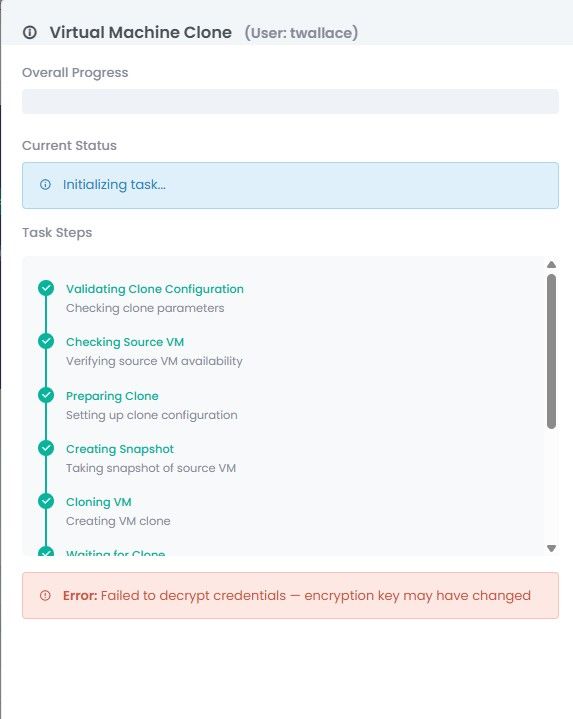
  • Decrypt credentials failure on VM create

    Compute & VMs
    6
    1
    0 Votes
    6 Posts
    286 Views
    woodyW
    @heky said: But now in 1.1.3 there is another error Error: Validation failed: {“ciuser”:[“Username is required when any cloud-init field is set.”]} So probably you need to address this. Creation VM from template is not possible.[image: 1779944432275-screenshot-2026-05-28-at-07.00.08-resized.png] @heky Can you please see my message I incorrectly directed to Twallace-armor.
  • Backup verbosity levels seems to high

    Product Feedback
    2
    1 Votes
    2 Posts
    190 Views
    StellS
    Yep great feedback. I’ll get this logged and into our backlog with a priority. Thanks @pean !
  • 1 Votes
    1 Posts
    116 Views
    T
    During the automated installation for “Auto Generate SSL” Caddy requires TCP 80 to be availble for the Acme Challenge for LetsEncrypt. This poses a security risk to allow either NAT translation or public services to allow TCP 80 to the Mulitportal host. There is functionality with Letsencrypt to leverage API tokens to providers such as Cloudflare which is used in e.g. NGINX to allow the LetsEncrypt acme challange to auth via API Token without the need for openning security senstive ports for a public facing service and allows Multiportal to reside in a DMZ airgapped environment from the internet. For example in a NGINX deployment on Ubuntu sudo apt install python3-certbot-dns-cloudflare sudo mkdir /etc/letsencrypt/secrets/cloudflare.ini # Either API Token (recommended) dns_cloudflare_api_token = <enter api token here> chmod 600 /etc/letsencrypt/secrets/cloudflare.ini certbot certonly --dns-cloudflare --dns-cloudflare-credentials /etc/letsencrypt/secrets/cloudflare.ini -d cloudstack.somedomain.org. The available dns providers are as follows depending on python package are, Cloudflare DNS plugin for Certbot DigitalOcean DNS plugin for Certbot DNSimple DNS plugin for Certbot Gehirn DNS plugin for Certbot Google DNS plugin for Certbot Linode DNS plugin for Certbot OVH DNS plugin for Certbot RFC 2136 DNS plugin for Certbot SakuraCloud DNS plugin for Certbot Infomaniak DNS plugin for Certbot RFC 2136 DNS plugin for Certbot Route53 DNS plugin for Certbot SakuraCloud DNS plugin for Certbot Standalone DNS Authenticator plugin for Certbot If there was an option where during the automated install you could select your DNS provider, the installer install the correct package for Caddy and allow input for the API Token to create the .ini file it would provide a secure mechanism to create signed certificates for Caddy while being airgapped for Acme authentication.
  • Forum Rules

    Pinned Locked Announcements
    1
    1 Votes
    1 Posts
    175 Views
    StellS
    MultiPortal Community Guidelines Welcome to the MultiPortal Community - a space for service providers, homelabbers, IT pros, and infrastructure folks to connect, share knowledge, and help each other get the most out of MultiPortal. These guidelines keep things running smoothly. They’re pretty common sense, but worth spelling out. The Short Version Be helpful. We’re all here to solve problems and learn from each other. Be decent. Treat people the way you’d want to be treated. Stay on topic. This is a place for MultiPortal and infrastructure talk. If you want to talk about something random, keep it to the General Discussions forum. The Details Keep It Respectful Everyone’s welcome here, whether you’re in a massive telco or just getting started in your MSP. Disagree with ideas, not people. Healthy debate is fine - being a jerk isn’t. No harassment, discrimination, or personal attacks. Zero tolerance. Don’t be dismissive of questions that seem basic to you. We all started somewhere. Keep It Useful Asking for help? Search first - there’s a good chance someone’s already solved your problem. Use the templates in each forum - they exist to help you get better answers faster. Include the details: versions, error messages, what you’ve already tried. Post in the right category. Helping out? Be patient, especially with newcomers. Give practical advice, not just “RTFM” or a link with no context. If you’re not sure about something, say so. Bad advice is worse than no advice. Keep It Clean Don’t share passwords, API keys, or other secrets - even accidentally in logs or screenshots. Redact customer info and IP addresses before posting. Found a security issue? Email security@multiportal.io - don’t post it publicly. Keep It Legal No piracy, license hacks, or anything that circumvents licensing. Respect copyright. Quote and attribute when appropriate. Keep It On Topic Stick to MultiPortal, Proxmox, virtualization, and related infrastructure topics. General tech chat goes in Community → General Discussion. Save the politics and hot takes for somewhere else. Forum-Specific Notes Support Forums One problem per post. Don’t bundle unrelated issues. Mark your topic as solved when you get an answer - it helps others find solutions. Don’t bump repeatedly. Add new info if you have it, otherwise be patient. This is peer-to-peer support. For guaranteed response times, contact MultiPortal Support directly. Feedback & Ideas Check if someone’s already requested your feature - add your voice to existing threads instead of duplicating. Use the topic voting feature. Focus on the problem you’re trying to solve, not just the solution you want. Not every request will be built. That’s just how it goes. Beta Programs Beta content is confidential. Don’t share builds, screenshots, or unreleased features outside the beta forums. Give honest feedback - that’s why you’re here. Don’t run beta software in production. Seriously. Partner Zone Partner info stays in the Partner Zone. Follow your Partner Agreement. What Happens If Someone Breaks the Rules We’d rather not police things, but when needed: Heads up — Most issues get resolved with a quick note. Warning — Repeated issues may get a formal warning. Timeout — Continued problems can lead to a temporary suspension. Ban — Serious or persistent violations mean permanent removal. We aim to be fair and consistent. The moderators have final say. Getting Help Community questions: Post in the right forum. Official support: For production issues or guaranteed response, contact MultiPortal Support. Report a problem: Use the Report button or message a moderator. Questions about these guidelines: Post in General Discussion or ask a mod. Thanks for Being Here This community works because people like you show up, share what you know, and help each other out. We’re glad you’re part of it. ~ The MultiPortal Team Last updated: May 2026